


What's New
Here’s what’s new in the Sherpa since launching 1.0.0 in January 2025. Sherpa ShopOS is continuously evolving, with ongoing improvements and exciting new features designed to enhance your workflow. From efficiency-driven updates to brand-new capabilities, we’re committed to refining and expanding Sherpa to better support your business.
Version 1.5.0
New Sherpa tiers
Sherpa now offers a new lower-cost pricing tier, for shops that don’t need the full Sherpa ShopOS suite.
More flexible shipping estimates
Shipping in Job Details is now more flexible. Allocate shipping as a manual amount, a per-item rate, or a percent of the subtotal. Set your favorite default values in Sherpa's settings within the new Shop tab.

Simpler Linking for Cumulative Pricing
Linking job items for cumulative pricing is now simpler and more predictable, items are now solely linked based on the same artwork.
Version 1.4.3
Tax Report CSV export
You can now export all job income from the Tax Report as a CSV file, making it easier to share with your accountant or bring into Excel, Numbers, or other tools.
Version 1.4.0
Get Paid Faster with Integrated Payments
Sherpa now includes secure, built-in payment links for both Stripe and Square. You can collect deposits or final balances directly from your quotes and invoices, cutting out extra steps and speeding up every job’s cash flow. Payments land where they should and customers always know exactly what to do next.
Instant, Accountant-Ready Tax Reporting
The new Tax Report generates clean CSV exports with job-by-job totals. Send it straight to your bookkeeper or import it into your accounting software. It’s fast, consistent, and removes the end-of-month guesswork that slows shops down.
Smarter Pricing with Linked Quantities
A new Link button in the Pricing tab lets you combine quantities from related apparel items to take advantage of cumulative quantity pricing. Link 25 men’s tees with 25 women’s tees that share the same artwork, and Sherpa prices the job as 50 units instead of two separate runs. It’s accurate pricing without any manual math.
Custom Next Tier Selection for Quotes
Quotes now support custom next tier pricing selection whenever the entire job uses a single price matrix. If your artwork or items span multiple matrices and you want custom next tier pricing, simply create separate jobs to maintain clarity. This update gives you more power over how each quote is structured.
Clone Jobs with Full Customization
The Job Organizer now includes a Clone Job option that opens a customization dialog. Choose exactly what carries forward: customer details, apparel items, artwork, placements, estimates, or other job components. You get a precise duplicate tailored to the next job, not a messy copy.
Clone Screens with Detailed Options
Screen management is more flexible than ever. The new Clone Screen option lets you duplicate a screen and choose exactly which frame and mesh details carry over, including dimensions, mesh count, manufacturer, model, usage limits, and more. You can clone to one or many new screens at once, making it quick to create multiple identical entries when stocking up on standard frames. It’s the fastest way to add consistent, accurate records to your screen inventory.
Firm vs. Flexible In-Hand Dates
A new radio button in Job Details lets you mark the customer’s in-hand date as firm or flexible, and Sherpa’s Settings now include a default option so new jobs start as either Firm or Flexible automatically. Firm deadlines appear with a ⛔︎ prefix in the schedule so you can instantly see which events can’t be shifted, keeping planning clearer and protecting time-critical jobs.
Locked Scheduling for Firm Deadlines
The Job Organizer schedule can now only be modified when an in-hand date is flexible. For those rare cases where you need to shift a firm job, an Override firm lock checkbox gives you permission to move everything temporarily. It prevents accidental edits but still gives you full control when it’s truly needed.
Version 1.3.0
Fine-tune What Customers See
Quotes and Invoices now include a powerful new options panel that gives you full control over what’s shown to your customers. Choose to include or hide Artwork Names, Images, Detailed Notes, Unit Costs, and even Next Tier Pricing. Whether you want to keep things streamlined or showcase every detail, Sherpa lets you tailor each document to fit your workflow and client relationship.
More Accurate Pricing, Less Guesswork
Embroidery workflows now factor in stitch count as a core input for pricing. The new # Stitches field in the Artwork tab lets you define how dense or complex a design is, enabling Sherpa to automatically reference your stitch-based pricing matrix. This change ensures your embroidery quotes reflect both labor and material costs more precisely - especially for high-detail artwork.
See Dimensions. Preview Instantly.
You can now view artwork width and height directly in the Decoration screen, giving you immediate visual context when reviewing placements or making sizing decisions. Each individual placement also includes a dedicated Preview (eye) button, making it easy to inspect the assigned artwork without leaving the screen. These dimensions are also available in Sidekick, providing clear, on-the-floor reference for production teams to ensure accuracy during printing or embroidery.
Get Up and Running Faster
New to Sherpa? Skip the heavy setup and jump right in. During onboarding, you can now preload Sample Price Matrices tailored to common decoration types like screen printing or embroidery. It’s the fastest way to explore Sherpa’s pricing engine, test workflows, and get a feel for how everything works - before customizing it with your shop’s actual numbers.
Version 1.2.0
Improved Jersey Management & Expanded Placements
A newly enhanced Team Roster interface now spans Atlas, Sherpa, and Sidekick - bringing a consistent experience from customer input to final production. Jersey sizes are displayed directly within the roster, making it faster to review and assign details. Combined with expanded placement options for names, numbers, sleeves, shoulders, and more, this update delivers greater control and clarity throughout the entire workflow.
Smarter Guideposts with Two-Path Navigation
Guideposts just got an upgrade. For steps with multiple valid workflows, Guideposts now walk you through both options - tap once for the first path, and again for the alternative. It’s a smarter way to guide users through complex choices without extra training.
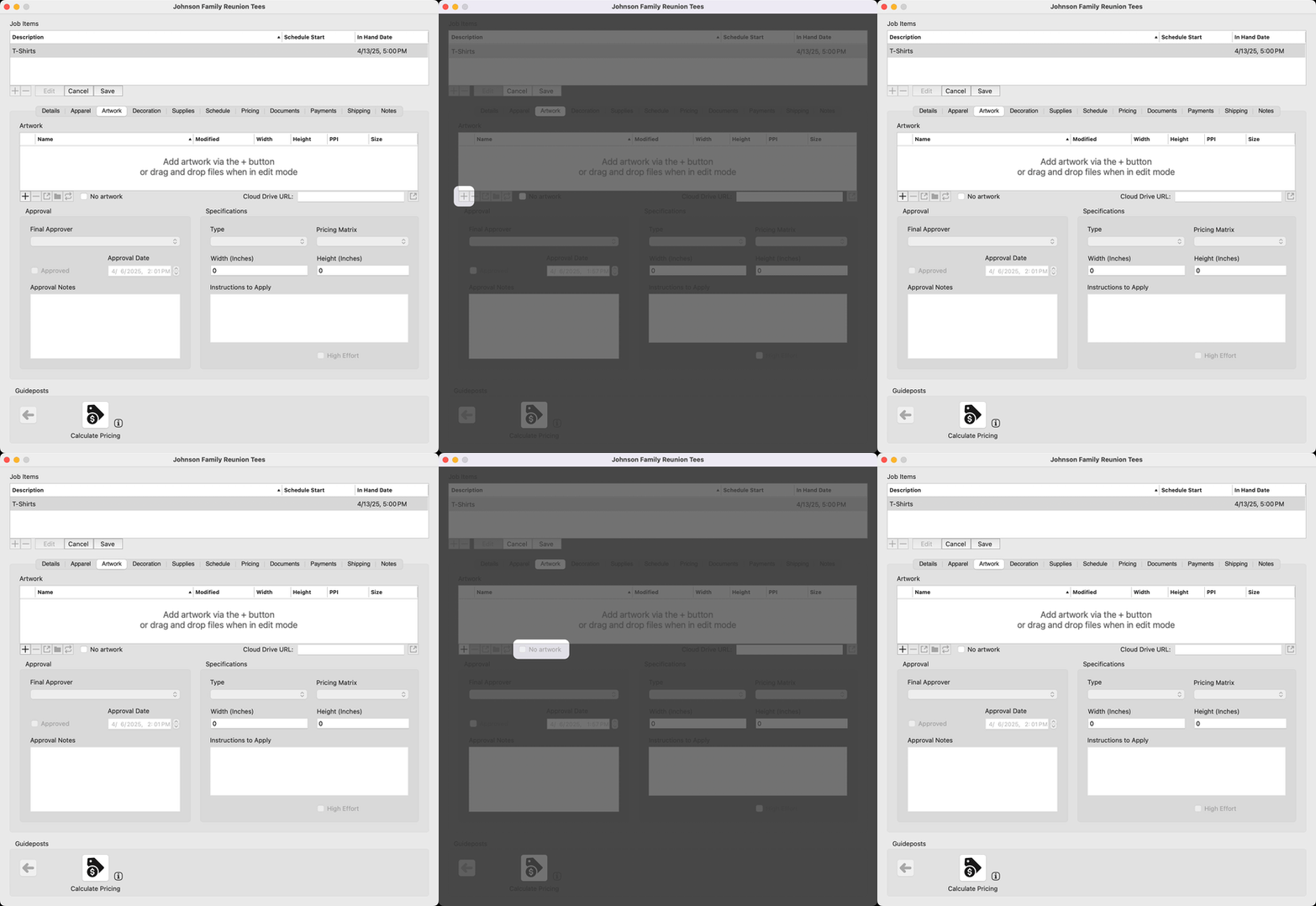
Flexible Job Setup: No Artwork & No Decorations
Not every job needs artwork or decorations. Two new checkboxes - No Artwork and No Decorations - let you clearly mark those exceptions. This streamlines your setup, reduces confusion, and keeps your workflow clean when dealing with simpler apparel items.
Better Small-Screen Experience in Atlas (Customer Portal)
The interface in Atlas has been refined for smaller devices, with improved layout and control sizing tailored for compact screens like the iPhone SE. Interacting with forms, buttons, and navigation is now more comfortable and intuitive without sacrificing clarity or usability.
Version 1.1.0
Quote It. Invoice It. Done.
Sherpa now makes it easier than ever to manage your sales process - quotes and invoices can be generated instantly as PDFs and emailed directly to your customers. Whether you’re closing a sale or sending a final bill, Sherpa keeps everything streamlined, professional, and all in one place.
Embroidery, Fully Dialed In
Embroidery is officially in the lineup. Sherpa now supports embroidery workflows - complete with full thread color management. It’s everything you need to keep embroidery running smoothly, right alongside your other processes.
Hands-Free Jersey Tracking in Sidekick
You can now use the PageFlip Dragonfly foot pedal to mark player jerseys as complete on the Production screen in Sidekick. Perfect for sports apparel orders, this update extends hands-free support to toggle switches next to each player’s name and number.
Visual Workflow Cues
Sherpa’s production process just got more visual - each process type now features a unique icon and description, making it faster and easier to identify tasks at a glance. Stay focused, reduce confusion, and keep your workflow moving smoothly with clear visual cues every step of the way.

Smarter Step Highlighting
Guidepost navigation is now even more intuitive - when you click a Guidepost button, the next step is clearly highlighted within the window, making it easier to know exactly where to go next.
Streamlined Artwork Application in Atlas
Uploading artwork in Atlas (Customer Portal) just got a whole lot smoother. Now, when you add new artwork, Atlas instantly prompts you to choose how you’d like to apply it: Don’t Apply, Apply to Current, or Apply to All. The artwork is only added to placements that don’t already have artwork assigned - so no accidental overwrites. It’s faster, cleaner, and saves you clicks.
Version 1.0.1
Team Roster Entry Now in Atlas (Customer Portal)
Save time and reduce errors! Coaches can now enter their team roster directly in the Atlas (Customer Portal), ensuring accurate player names and numbers from the start. This streamlined process eliminates back-and-forth communication and helps your shop get orders into production faster.
Track Completed Sports Apparel in Production
Managing team orders just got easier! In the Sidekick Production screen, you can now track the completion of sports apparel orders with individual toggle switches next to each player’s name and number.
Quickly mark items as completed and stay on top of production progress with a clear, at-a-glance view of what’s done and what’s left.
Bits & Grit
Real stories, smart tools, and workflow ideas for people who get things done.
SubscribeProud member


© 2023- Ministry of Bits, LLC. All rights reserved.
Other names and brands may be claimed as the property of others.